Return policy
Discover our returns policy here
Do you have any questions about our returns policy? you can always view our frequently asked questions or contact us.

30-day returns policy
All products are eligible for a 30-day return policy starting from the date of receipt.

RMA claims: refund, exchange or credit
RMA claims can be fully or partially credited, exchanged, or refunded.
SYA NV is not liable for any loss or damage to data or information stored on returned devices.
Submit RMA
How can you submit an RMA?
Below we explain how you can submit an RMA/return.

Access orders
Go to your account and open the profile menu. Click on "orders" to view your order history.
Access orders
Go to your account and open the profile menu. Click on "orders" to view your order history.

Order details view
In the orders overview you can see all your previous orders. Click on the "detail" button for the order for which you want to request a return.
Order details view
In the orders overview you can see all your previous orders. Click on the "detail" button for the order for which you want to request a return.
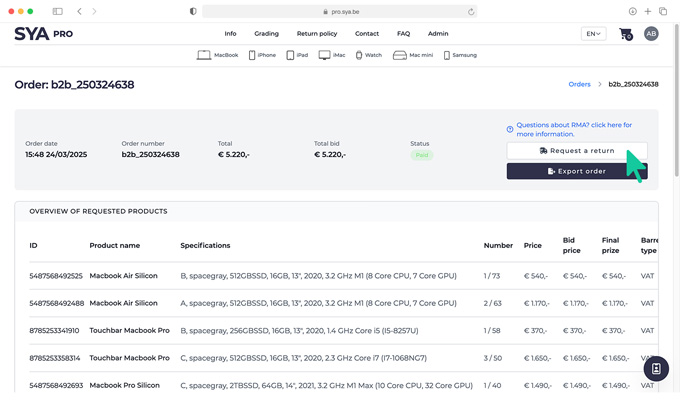
Start return request
Please note: return requests are only possible for paid orders and within 30 days of delivery confirmation. If your order meets these conditions, click on the "request a return" button.
Start return request
Please note: return requests are only possible for paid orders and within 30 days of delivery confirmation. If your order meets these conditions, click on the "request a return" button.

Select product
Select the product or products from your order that you want to return by checking the relevant item.
Select product
Select the product or products from your order that you want to return by checking the relevant item.

Complete product information
Enter the following information for each selected product: product serial number reason for return (select from the list) your preference for compensation (refund or exchange) upload clear photos of the product as evidence
Complete product information
Enter the following information for each selected product: product serial number reason for return (select from the list) your preference for compensation (refund or exchange) upload clear photos of the product as evidence

Returning multiple products
Do you want to return multiple items? add a new line for each product. For identical products in different quantities, you can add a line per piece or select one product with the correct quantity.
Returning multiple products
Do you want to return multiple items? add a new line for each product. For identical products in different quantities, you can add a line per piece or select one product with the correct quantity.

Submit a return request
Check whether all information is entered correctly and completely. Then click on the "submit a return request" button to send your request.
Submit a return request
Check whether all information is entered correctly and completely. Then click on the "submit a return request" button to send your request.

Return status tracking
After submitting your request, you can view the status of your return in the detail overview of your order.
Return status tracking
After submitting your request, you can view the status of your return in the detail overview of your order.

Prepare shipping
Once we accept your RMA, you will receive an email regarding the status of your RMA. Attached, you will find the RMA document, which you must download and include with your shipment. This document is crucial for the correct processing of the return. Make sure it is properly enclosed in the package. You can also download this document here once we have accepted your RMA.
Prepare shipping
Once we accept your RMA, you will receive an email regarding the status of your RMA. Attached, you will find the RMA document, which you must download and include with your shipment. This document is crucial for the correct processing of the return. Make sure it is properly enclosed in the package. You can also download this document here once we have accepted your RMA.

Confirm Shipping
Once you have shipped the product, please report this in your account by clicking "confirm shipment". Please keep your proof of postage carefully.
Confirm Shipping
Once you have shipped the product, please report this in your account by clicking "confirm shipment". Please keep your proof of postage carefully.

Shipping info
A popup will open where you can add a shipping link. This is optional. If you don't have a shipping link, you can still confirm shipping without completing it.
Shipping info
A popup will open where you can add a shipping link. This is optional. If you don't have a shipping link, you can still confirm shipping without completing it.
FAQ
Frequently asked questions about our returns policy
Here you will find answers to the most frequently asked questions about our returns policy.
-
Yes, all products come with a standard 1-month warranty. Extended warranty options are available for an additional fee.
-
SYA Pro offers a hassle-free return policy for B2B customers. Returns are accepted within 30 days of delivery. You can find more on our return/rma policy page.
-
Submit a warranty claim through your SYA Pro account by filling in all requiered fields. You can find more info on our return/rma policy page.